Multi-session
Run many WhatsApp numbers from one deployment, each with its own session, proxy and send settings.
Run your own WhatsApp API on your own server. WaSphere gives developers, hosting resellers and billing systems a REST API, a dashboard and signed webhooks, with no per-message fees and no managed service in the middle.
WaSphere is a WhatsApp API platform you host yourself. Your WhatsApp sessions and contact data stay on your own infrastructure, so there is no vendor holding them and no fee per message. It is MIT licensed, so you can run it anywhere, fork it and ship it.
It is built for developers, hosting and WHMCS resellers, and billing systems that want a WhatsApp gateway they fully own. You connect one or many WhatsApp numbers, send messages through a REST API, receive incoming messages and status updates as signed webhooks, and manage everything from a web dashboard.
Run many WhatsApp numbers from one deployment, each with its own session, proxy and send settings.
Text, image, video, audio and voice notes, documents, stickers, GIFs, view-once, buttons, lists, polls, reactions, locations and contact cards.
Every send type has its own endpoint. Authenticate with scoped API keys and call it from any language.
Incoming messages and status updates are posted to your URL, signed with HMAC-SHA256, with retries and automatic deactivation of failing hooks.
A Next.js console for sessions, webhooks, API keys, messaging and the audit log, with dark mode.
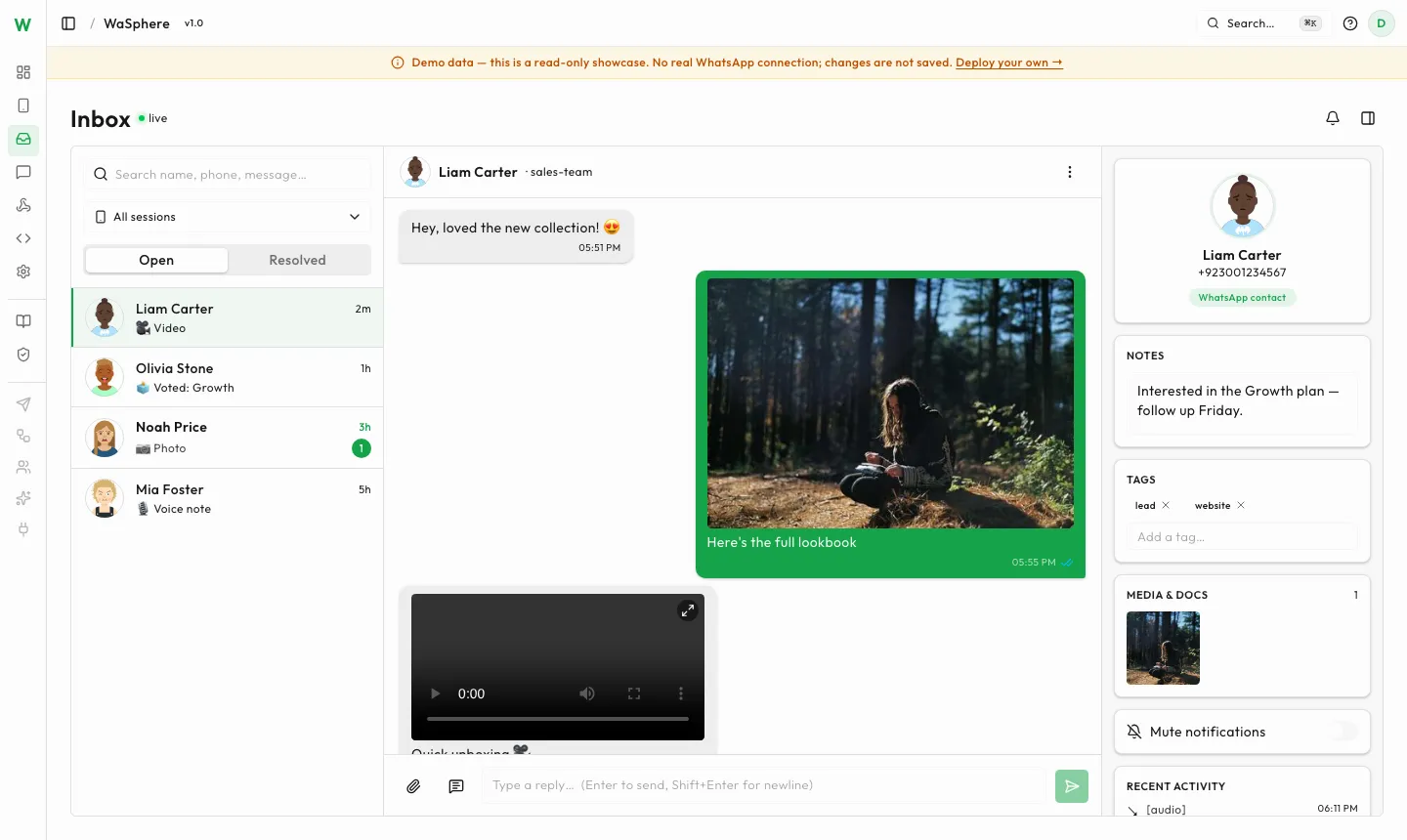
A two-pane inbox with media, reactions, tags, notes, mute and a contacts list with CSV import and export. Live updates over server-sent events.
Send a poll and receive the decrypted vote on a poll.vote webhook. Useful for order confirmation in Shopify or WooCommerce flows.
Twelve permission scopes, with optional per-session scoping. Keys are stored hashed and shown once.
Configurable per-session send delays, auto-read and receipts, and sliding-window rate limiting.
An interactive API reference ships with both services, so every endpoint and schema is one click away.
Every API request is logged and filterable, with 90-day retention.
docker compose up -d starts the whole stack and runs database migrations automatically.
WaSphere runs as three services. The WhatsApp engine is kept in its own service so the GPL-licensed library stays apart from your application layer.
| Service | What it does | Built with |
|---|---|---|
| WA Server | The WhatsApp gateway: sessions, messages, contacts and groups | NestJS, TypeScript, Baileys |
| Dashboard API | Auth, workspaces, API keys, webhook delivery, audit log and a token-injecting proxy to the WA Server | NestJS, Prisma, PostgreSQL 16 |
| Dashboard UI | The management console. It talks only to the Dashboard API, so the WA Server token never reaches the browser | Next.js 16, Tailwind CSS, ShadCN UI |
Requests go through the Dashboard API, which proxies to your WA Server. Authenticate with a scoped key.
curl -X POST https://api.your-domain.com/workspaces/{workspaceId}/proxy/api/sessions/{sessionId}/messages/text \
  -H "Authorization: Bearer wsk_your_key" \
  -H "Content-Type: application/json" \
-d '{ "to": "12125550100", "text": "Hello from WaSphere!" }'git clone https://github.com/wasphere/wasphere.git
cd wasphere
cp .env.example .env
# set POSTGRES_PASSWORD, JWT_SECRET, ENCRYPTION_KEY, WA_TOKEN,
# WEBHOOK_SIGNING_SECRET and INTERNAL_WEBHOOK_SECRET
docker compose up -dYes. It is open source under the MIT license. You pay only for your own server. There are no per-message fees.
A server with Docker Engine 24 or later and Docker Compose v2. The whole stack starts with one docker compose command. For a public deployment, add your own reverse proxy for TLS.
The WhatsApp gateway is built on Baileys, an open-source library that connects the way WhatsApp Web does. It is not a hosted service from Meta, so follow the WhatsApp terms and use sensible send delays. WaSphere includes per-session delays and auto-read settings for that reason. It also lists a template endpoint for Meta Cloud API sessions.
Call the REST API with a scoped API key. For example, POST to the text message endpoint with the recipient number and the text. The page above has a curl example, and a full interactive API reference ships with the app.
WaSphere has no plugin for them, but it works with anything that can call a REST API or receive a webhook. Incoming messages and poll votes are posted to your URL as signed webhooks. The project README shows an n8n webhook as an example.
Yes. We can deploy and secure WaSphere on your server and build WhatsApp automations around it. See AI and WhatsApp automation and custom software.
The code is free. If you would rather have it installed, customised or built into your product, the same team that wrote it can do the work.
A free Mac cleaner that shows what it found before anything is removed. Smart Scan, Running Services that finds leftover processes holding deleted files, one-click project build cleanup, a disk space map, duplicate and similar photo finders, an app uninstaller and a system monitor, built natively in Swift.
WHMCS moduleRegister, renew, transfer and manage nameservers for Spaceship domains straight from WHMCS. Clean PHP, no ionCube.
AI agent skillAn AI agent skill pack for building WHMCS modules faster and correctly.
Free templateA free React + Vite admin dashboard template with a ready-made component set.
A free 15-minute call, then a written scope and estimate. No obligation, no sales script.
Talk to Wasevo AI
Voice · English, Urdu, Hindi
Try the voice agent
Ask about our services, prices, projects or booking a call. Your microphone starts only when you press Start.